
Sorting Data
Sorting puts rows in order by one column: smallest to largest, A to Z, or the reverse. In Excel use Data > Sort, or the Sort & Filter button on the Home tab. Select the whole table first so every row moves together, otherwise one column gets out of step with the others.
A formula can sort too. SORT(range, column, order) returns the rows in order (order 1 is ascending, -1 is descending). The result spills: it fills the empty cells below and beside the formula. Here the table in A1:B5 is sorted by score, largest first.
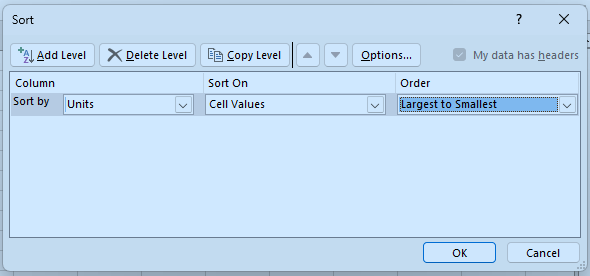
In Excel: click any cell in the table, open the Data tab and choose Sort. Pick the column to sort by and the order, then press OK.

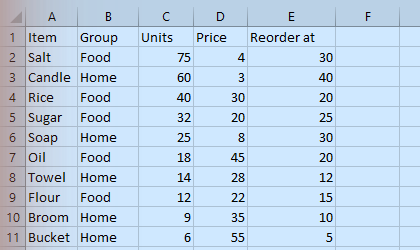
After sorting, every row has moved together:
Why select the whole table before sorting one column?
Sort the table A2:B4 by the second column from smallest to largest, starting in D2.
Finish the quick check (and any code exercise) to complete this lesson, or mark it done yourself.
Tip: use the left and right arrow keys to move between lessons.